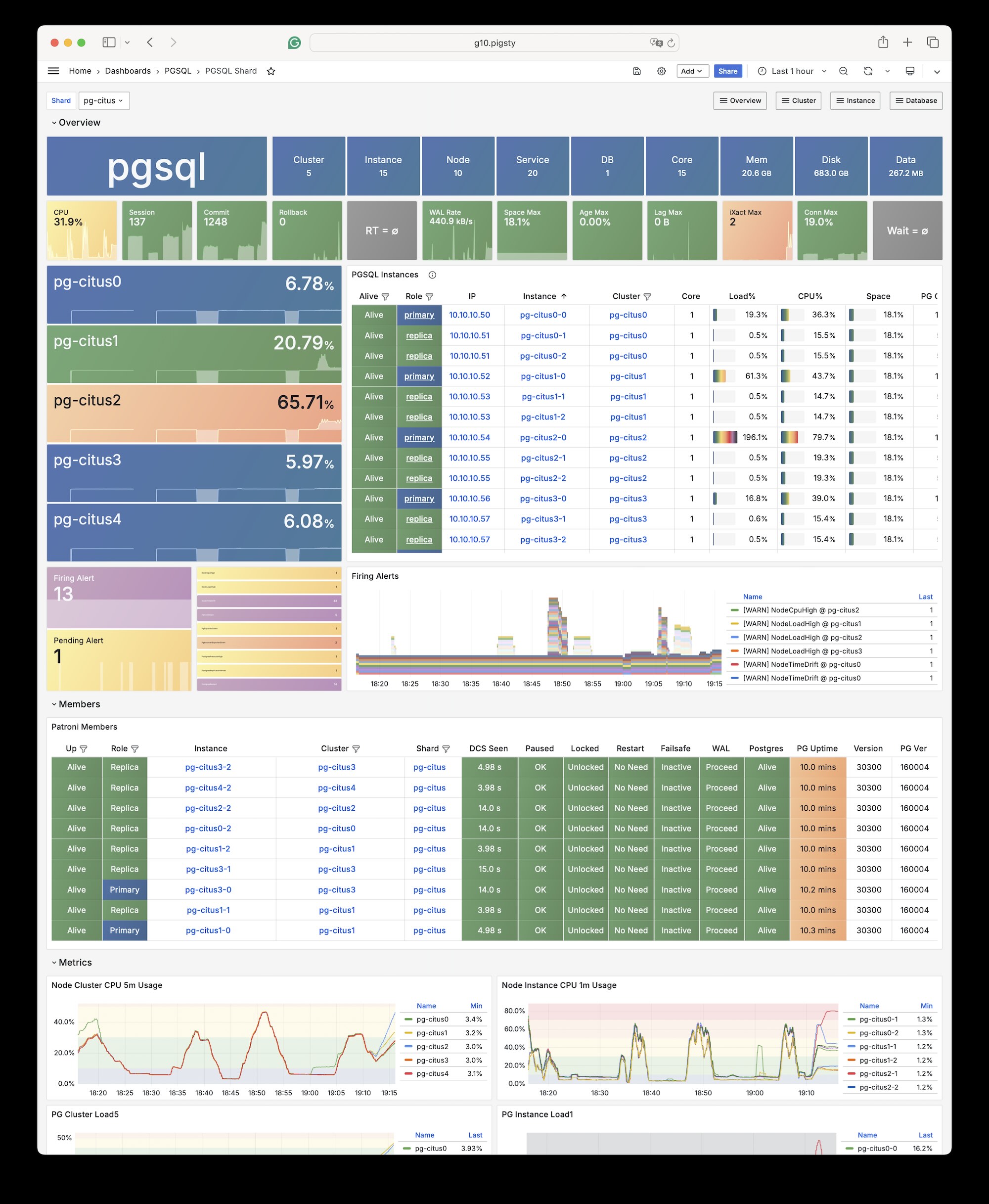
Deploy native high-availability Citus horizontally sharded clusters with Pigsty, seamlessly scaling PostgreSQL across multiple shards and accelerating OLTP/OLAP queries.
Pigsty natively supports Citus. This is a distributed horizontal scaling extension based on the native PostgreSQL kernel.
Installation
Citus is a PostgreSQL extension plugin that can be installed and enabled on a native PostgreSQL cluster following the standard plugin installation process.
To define a citus cluster, you need to specify the following parameters:
pg_mode must be set to citus instead of the default pgsql
You must define the shard name pg_shard and shard number pg_group on each shard cluster
You must define pg_primary_db to specify the database managed by Patroni
If you want to use postgres from pg_dbsu instead of the default pg_admin_username to execute admin commands, then pg_dbsu_password must be set to a non-empty plaintext password
Additionally, you need extra hba rules to allow SSL access from localhost and other data nodes.
You can define each Citus cluster as a separate group, like standard PostgreSQL clusters. The current complete template is conf/ha/citus.yml:
all:children:pg-citus0:# citus shard 0hosts:{10.10.10.10:{pg_seq:1, pg_role:primary } }vars:{pg_cluster:pg-citus0 , pg_group:0}pg-citus1:# citus shard 1hosts:{10.10.10.11:{pg_seq:1, pg_role:primary } }vars:{pg_cluster:pg-citus1 , pg_group:1}pg-citus2:# citus shard 2hosts:{10.10.10.12:{pg_seq:1, pg_role:primary } }vars:{pg_cluster:pg-citus2 , pg_group:2}pg-citus3:# citus shard 3hosts:10.10.10.13:{pg_seq:1, pg_role:primary }10.10.10.14:{pg_seq:2, pg_role:replica }vars:{pg_cluster:pg-citus3 , pg_group:3}vars:# Global parameters for all Citus clusterspg_mode:citus # pgsql cluster mode must be set to: cituspg_shard:pg-citus # citus horizontal shard name: pg-cituspg_primary_db:meta # citus database name: metapg_dbsu_password:DBUser.Postgres# If using dbsu, you need to configure a password for itpg_users:[{name:dbuser_meta ,password:DBUser.Meta ,pgbouncer:true ,roles:[dbrole_admin ] } ]pg_databases:[{name:meta ,extensions:[{name:citus }, { name: postgis }, { name: timescaledb } ] } ]pg_hba_rules:- {user:'all' ,db:all ,addr:127.0.0.1/32 ,auth:ssl ,title:'all user ssl access from localhost'}- {user:'all' ,db:all ,addr:intra ,auth:ssl ,title:'all user ssl access from intranet'}
You can also specify identity parameters for all Citus cluster members within a single group, as shown in conf/ha/citus.yml:
#==========================================================## pg-citus: 10 node citus cluster (5 x primary-replica pair)#==========================================================#pg-citus:# citus grouphosts:10.10.10.50:{pg_group:0, pg_cluster:pg-citus0 ,pg_vip_address:10.10.10.60/24 ,pg_seq:0, pg_role:primary }10.10.10.51:{pg_group:0, pg_cluster:pg-citus0 ,pg_vip_address:10.10.10.60/24 ,pg_seq:1, pg_role:replica }10.10.10.52:{pg_group:1, pg_cluster:pg-citus1 ,pg_vip_address:10.10.10.61/24 ,pg_seq:0, pg_role:primary }10.10.10.53:{pg_group:1, pg_cluster:pg-citus1 ,pg_vip_address:10.10.10.61/24 ,pg_seq:1, pg_role:replica }10.10.10.54:{pg_group:2, pg_cluster:pg-citus2 ,pg_vip_address:10.10.10.62/24 ,pg_seq:0, pg_role:primary }10.10.10.55:{pg_group:2, pg_cluster:pg-citus2 ,pg_vip_address:10.10.10.62/24 ,pg_seq:1, pg_role:replica }10.10.10.56:{pg_group:3, pg_cluster:pg-citus3 ,pg_vip_address:10.10.10.63/24 ,pg_seq:0, pg_role:primary }10.10.10.57:{pg_group:3, pg_cluster:pg-citus3 ,pg_vip_address:10.10.10.63/24 ,pg_seq:1, pg_role:replica }10.10.10.58:{pg_group:4, pg_cluster:pg-citus4 ,pg_vip_address:10.10.10.64/24 ,pg_seq:0, pg_role:primary }10.10.10.59:{pg_group:4, pg_cluster:pg-citus4 ,pg_vip_address:10.10.10.64/24 ,pg_seq:1, pg_role:replica }vars:pg_mode:citus # pgsql cluster mode: cituspg_shard:pg-citus # citus shard name: pg-cituspg_primary_db:test # primary database used by cituspg_dbsu_password:DBUser.Postgres# all dbsu password access for citus clusterpg_vip_enabled:truepg_vip_interface:autopg_extensions:['citus postgis timescaledb pgvector']pg_libs:'citus, timescaledb, pg_stat_statements, auto_explain'# citus will be added by patroni automaticallypg_users:[{name:test ,password:test ,pgbouncer:true ,roles:[dbrole_admin ] } ]pg_databases:[{name:test ,owner:test ,extensions:[{name:citus }, { name: postgis } ] } ]pg_hba_rules:- {user:'all' ,db:all ,addr:10.10.10.0/24 ,auth:trust ,title:'trust citus cluster members'}- {user:'all' ,db:all ,addr:127.0.0.1/32 ,auth:ssl ,title:'all user ssl access from localhost'}- {user:'all' ,db:all ,addr:intra ,auth:ssl ,title:'all user ssl access from intranet'}
Usage
You can access any node just like accessing a regular cluster: