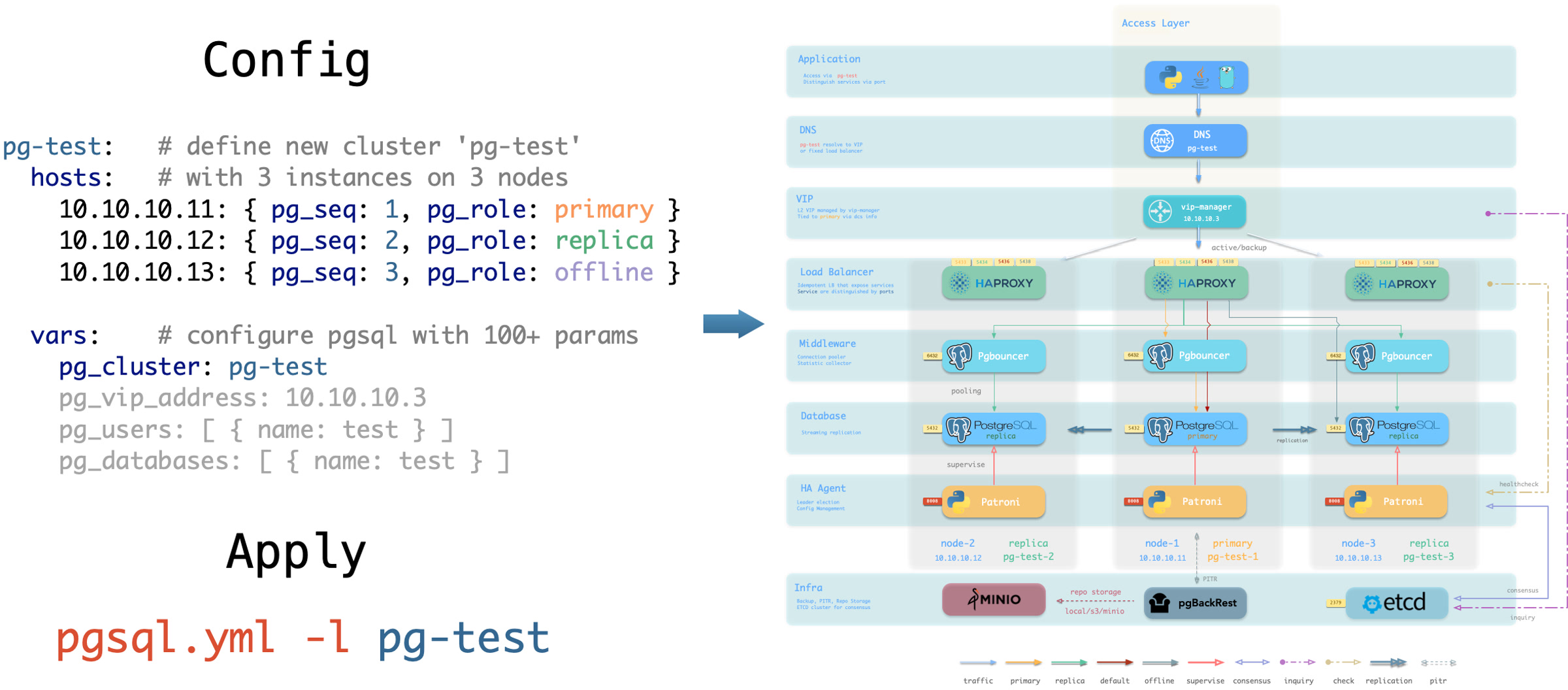
Pigsty follows the IaC and GitOPS philosophy: use a declarative config inventory to describe the entire environment, and materialize it through idempotent playbooks.
Users describe their desired state declaratively through parameters, and playbooks idempotently adjust target nodes to reach that state.
This is similar to Kubernetes CRDs & Operators, but Pigsty implements this functionality on bare metal and virtual machines through Ansible.
Pigsty was born to solve the operational management problem of ultra-large-scale PostgreSQL clusters. The idea behind it is simple — we need the ability to replicate the entire infrastructure (100+ database clusters + PG/Redis + observability) on ready servers within ten minutes.
No GUI + ClickOps can complete such a complex task in such a short time, making CLI + IaC the only choice — it provides precise, efficient control.
The config inventory pigsty.yml file describes the state of the entire deployment. Whether it’s production (prod), staging, test, or development (devbox) environments,
the difference between infrastructures lies only in the config inventory, while the deployment delivery logic is exactly the same.
You can use git for version control and auditing of this deployment “seed/gene”, and Pigsty even supports storing the config inventory as database tables in PostgreSQL CMDB, further achieving Infra as Data capability.
Seamlessly integrate with your existing workflows.
IaC is designed for professional users and enterprise scenarios but is also deeply optimized for individual developers and SMBs.
Even if you’re not a professional DBA, you don’t need to understand these hundreds of adjustment knobs and switches. All parameters come with well-performing default values.
You can get an out-of-the-box single-node database with zero configuration;
Simply add two more IP addresses to get an enterprise-grade high-availability PostgreSQL cluster.
Declare Modules
Take the following default config snippet as an example. This config describes a node 10.10.10.10 with INFRA, NODE, ETCD, and PGSQL modules installed.
# monitoring, alerting, DNS, NTP and other infrastructure cluster...infra:{hosts:{10.10.10.10:{infra_seq:1}}}# minio cluster, s3 compatible object storageminio:{hosts:{10.10.10.10:{minio_seq:1 } }, vars:{minio_cluster:minio } }# etcd cluster, used as DCS for PostgreSQL high availabilityetcd:{hosts:{10.10.10.10:{etcd_seq:1 } }, vars:{etcd_cluster:etcd } }# PGSQL example cluster: pg-metapg-meta:{hosts:{10.10.10.10:{pg_seq:1, pg_role:primary } }, vars:{pg_cluster:pg-meta } }
To actually install these modules, execute the following playbooks:
./infra.yml -l 10.10.10.10 # Initialize infra module on node 10.10.10.10./etcd.yml -l 10.10.10.10 # Initialize etcd module on node 10.10.10.10./minio.yml -l 10.10.10.10 # Initialize minio module on node 10.10.10.10./pgsql.yml -l 10.10.10.10 # Initialize pgsql module on node 10.10.10.10
Declare Clusters
You can declare PostgreSQL database clusters by installing the PGSQL module on multiple nodes, making them a service unit:
For example, to deploy a three-node high-availability PostgreSQL cluster using streaming replication on the following three Pigsty-managed nodes,
you can add the following definition to the all.children section of the config file pigsty.yml:
Not only can you define clusters declaratively, but you can also define databases, users, services, and HBA rules within the cluster. For example, the following config file deeply customizes the content of the default pg-meta single-node database cluster:
Including: declaring six business databases and seven business users, adding an extra standby service (synchronous standby, providing read capability with no replication delay), defining some additional pg_hba rules, an L2 VIP address pointing to the cluster primary, and a customized backup strategy.
pg-meta:hosts:{10.10.10.10:{pg_seq:1, pg_role:primary , pg_offline_query:true}}vars:pg_cluster:pg-metapg_databases:# define business databases on this cluster, array of database definition- name:meta # REQUIRED, `name` is the only mandatory field of a database definitionbaseline:cmdb.sql # optional, database sql baseline path, (relative path among ansible search path, e.g files/)pgbouncer:true# optional, add this database to pgbouncer database list? true by defaultschemas:[pigsty] # optional, additional schemas to be created, array of schema namesextensions:# optional, additional extensions to be installed: array of `{name[,schema]}`- {name:postgis , schema:public }- {name:timescaledb }comment:pigsty meta database # optional, comment string for this databaseowner:postgres # optional, database owner, postgres by defaulttemplate:template1 # optional, which template to use, template1 by defaultencoding:UTF8 # optional, database encoding, UTF8 by default. (MUST same as template database)locale:C # optional, database locale, C by default. (MUST same as template database)lc_collate:C # optional, database collate, C by default. (MUST same as template database)lc_ctype:C # optional, database ctype, C by default. (MUST same as template database)tablespace:pg_default # optional, default tablespace, 'pg_default' by default.allowconn:true# optional, allow connection, true by default. false will disable connect at allrevokeconn:false# optional, revoke public connection privilege. false by default. (leave connect with grant option to owner)register_datasource:true# optional, register this database to grafana datasources? true by defaultconnlimit:-1# optional, database connection limit, default -1 disable limitpool_auth_user:dbuser_meta # optional, all connection to this pgbouncer database will be authenticated by this userpool_mode:transaction # optional, pgbouncer pool mode at database level, default transactionpool_size:64# optional, pgbouncer pool size at database level, default 64pool_reserve:32# optional, pgbouncer pool size reserve at database level, default 32pool_size_min:0# optional, pgbouncer pool size min at database level, default 0pool_connlimit:100# optional, max database connections at database level, default 100- {name:grafana ,owner:dbuser_grafana ,revokeconn:true ,comment:grafana primary database }- {name:bytebase ,owner:dbuser_bytebase ,revokeconn:true ,comment:bytebase primary database }- {name:kong ,owner:dbuser_kong ,revokeconn:true ,comment:kong the api gateway database }- {name:gitea ,owner:dbuser_gitea ,revokeconn:true ,comment:gitea meta database }- {name:wiki ,owner:dbuser_wiki ,revokeconn:true ,comment:wiki meta database }pg_users:# define business users/roles on this cluster, array of user definition- name:dbuser_meta # REQUIRED, `name` is the only mandatory field of a user definitionpassword:DBUser.Meta # optional, password, can be a scram-sha-256 hash string or plain textlogin:true# optional, can log in, true by default (new biz ROLE should be false)superuser:false# optional, is superuser? false by defaultcreatedb:false# optional, can create database? false by defaultcreaterole:false# optional, can create role? false by defaultinherit:true# optional, can this role use inherited privileges? true by defaultreplication:false# optional, can this role do replication? false by defaultbypassrls:false# optional, can this role bypass row level security? false by defaultpgbouncer:true# optional, add this user to pgbouncer user-list? false by default (production user should be true explicitly)connlimit:-1# optional, user connection limit, default -1 disable limitexpire_in:3650# optional, now + n days when this role is expired (OVERWRITE expire_at)expire_at:'2030-12-31'# optional, YYYY-MM-DD 'timestamp' when this role is expired (OVERWRITTEN by expire_in)comment:pigsty admin user # optional, comment string for this user/roleroles:[dbrole_admin] # optional, belonged roles. default roles are: dbrole_{admin,readonly,readwrite,offline}parameters:{}# optional, role level parameters with `ALTER ROLE SET`pool_mode:transaction # optional, pgbouncer pool mode at user level, transaction by defaultpool_connlimit:-1# optional, max database connections at user level, default -1 disable limit- {name:dbuser_view ,password:DBUser.Viewer ,pgbouncer:true ,roles:[dbrole_readonly], comment:read-only viewer for meta database}- {name:dbuser_grafana ,password:DBUser.Grafana ,pgbouncer:true ,roles:[dbrole_admin] ,comment:admin user for grafana database }- {name:dbuser_bytebase ,password:DBUser.Bytebase ,pgbouncer:true ,roles:[dbrole_admin] ,comment:admin user for bytebase database }- {name:dbuser_kong ,password:DBUser.Kong ,pgbouncer:true ,roles:[dbrole_admin] ,comment:admin user for kong api gateway }- {name:dbuser_gitea ,password:DBUser.Gitea ,pgbouncer:true ,roles:[dbrole_admin] ,comment:admin user for gitea service }- {name:dbuser_wiki ,password:DBUser.Wiki ,pgbouncer:true ,roles:[dbrole_admin] ,comment:admin user for wiki.js service }pg_services:# extra services in addition to pg_default_services, array of service definition# standby service will route {ip|name}:5435 to sync replica's pgbouncer (5435->6432 standby)- name:standby # required, service name, the actual svc name will be prefixed with `pg_cluster`, e.g: pg-meta-standbyport:5435# required, service exposed port (work as kubernetes service node port mode)ip:"*"# optional, service bind ip address, `*` for all ip by defaultselector:"[]"# required, service member selector, use JMESPath to filter inventorydest:default # optional, destination port, default|postgres|pgbouncer|<port_number>, 'default' by defaultcheck:/sync # optional, health check url path, / by defaultbackup:"[? pg_role == `primary`]"# backup server selectormaxconn:3000# optional, max allowed front-end connectionbalance:roundrobin # optional, haproxy load balance algorithm (roundrobin by default, other: leastconn)options:'inter 3s fastinter 1s downinter 5s rise 3 fall 3 on-marked-down shutdown-sessions slowstart 30s maxconn 3000 maxqueue 128 weight 100'pg_hba_rules:- {user:dbuser_view , db:all ,addr:infra ,auth:pwd ,title:'allow grafana dashboard access cmdb from infra nodes'}pg_vip_enabled:truepg_vip_address:10.10.10.2/24pg_vip_interface:eth1pg_crontab:# full backup daily at 1am (installed in the postgres user crontab)- '00 01 * * * /pg/bin/pg-backup full'
Declare Access Control
You can also customize Pigsty’s access control through declarative configuration. For example, the following config file provides deep security customization for the pg-meta cluster:
Uses the three-node core cluster template: crit.yml, to ensure data consistency is prioritized with zero data loss during failover.
Enables L2 VIP and restricts database and connection pool listening addresses to local loopback IP + internal network IP + VIP three specific addresses.
The template enables TLS for the Patroni API and PgBouncer, and requires SSL for database access through HBA.
It also enables $libdir/passwordcheck in pg_libs to enforce a password-strength policy.
Finally, a separate pg-meta-delay cluster is declared as pg-meta’s delayed replica from one hour ago, for emergency data deletion recovery.
pg-meta:# 3 instance postgres cluster `pg-meta`hosts:10.10.10.10:{pg_seq:1, pg_role:primary }10.10.10.11:{pg_seq:2, pg_role:replica }10.10.10.12:{pg_seq:3, pg_role:replica , pg_offline_query:true}vars:pg_cluster:pg-metapg_conf:crit.ymlpg_users:- {name:dbuser_meta , password:DBUser.Meta , pgbouncer:true , roles:[ dbrole_admin ] , comment:pigsty admin user }- {name:dbuser_view , password:DBUser.Viewer , pgbouncer:true , roles:[ dbrole_readonly ] , comment:read-only viewer for meta database }pg_databases:- {name:meta ,baseline:cmdb.sql ,comment:pigsty meta database ,schemas:[pigsty] ,extensions:[{name:postgis, schema:public}, {name: timescaledb}]}pg_default_service_dest:postgrespg_services:- {name:standby ,src_ip:"*",port:5435 , dest:default ,selector:"[]", backup:"[? pg_role == `primary`]"}pg_vip_enabled:truepg_vip_address:10.10.10.2/24pg_vip_interface:eth1pg_listen:'${ip},${vip},${lo}'patroni_ssl_enabled:truepgbouncer_sslmode:requirepgbackrest_method:miniopg_libs:'timescaledb, $libdir/passwordcheck, pg_stat_statements, auto_explain'# add passwordcheck extension to enforce strong passwordpg_default_roles:# default roles and users in postgres cluster- {name:dbrole_readonly ,login:false ,comment:role for global read-only access }- {name:dbrole_offline ,login:false ,comment:role for restricted read-only access }- {name:dbrole_readwrite ,login:false ,roles:[dbrole_readonly] ,comment:role for global read-write access }- {name:dbrole_admin ,login:false ,roles:[pg_monitor, dbrole_readwrite] ,comment:role for object creation }- {name:postgres ,superuser:true ,expire_in:7300 ,comment:system superuser }- {name:replicator ,replication:true ,expire_in:7300 ,roles:[pg_monitor, dbrole_readonly] ,comment:system replicator }- {name:dbuser_dba ,superuser:true ,expire_in:7300 ,roles:[dbrole_admin] ,pgbouncer:true ,pool_mode:session, pool_connlimit:16 , comment:pgsql admin user }- {name:dbuser_monitor ,roles:[pg_monitor] ,expire_in:7300 ,pgbouncer:true ,parameters:{log_min_duration_statement:1000 } ,pool_mode:session ,pool_connlimit:8 ,comment:pgsql monitor user }pg_default_hba_rules:# postgres host-based auth rules by default- {user:'${dbsu}',db:all ,addr:local ,auth:ident ,title:'dbsu access via local os user ident'}- {user:'${dbsu}',db:replication ,addr:local ,auth:ident ,title:'dbsu replication from local os ident'}- {user:'${repl}',db:replication ,addr:localhost ,auth:ssl ,title:'replicator replication from localhost'}- {user:'${repl}',db:replication ,addr:intra ,auth:ssl ,title:'replicator replication from intranet'}- {user:'${repl}',db:postgres ,addr:intra ,auth:ssl ,title:'replicator postgres db from intranet'}- {user:'${monitor}',db:all ,addr:localhost ,auth:pwd ,title:'monitor from localhost with password'}- {user:'${monitor}',db:all ,addr:infra ,auth:ssl ,title:'monitor from infra host with password'}- {user:'${admin}',db:all ,addr:infra ,auth:ssl ,title:'admin @ infra nodes with pwd & ssl'}- {user:'${admin}',db:all ,addr:world ,auth:cert ,title:'admin @ everywhere with ssl & cert'}- {user:'+dbrole_readonly',db:all ,addr:localhost ,auth:ssl ,title:'pgbouncer read/write via local socket'}- {user:'+dbrole_readonly',db:all ,addr:intra ,auth:ssl ,title:'read/write biz user via password'}- {user:'+dbrole_offline' ,db:all ,addr:intra ,auth:ssl ,title:'allow etl offline tasks from intranet'}pgb_default_hba_rules:# pgbouncer host-based authentication rules- {user:'${dbsu}',db:pgbouncer ,addr:local ,auth:peer ,title:'dbsu local admin access with os ident'}- {user:'all' ,db:all ,addr:localhost ,auth:pwd ,title:'allow all user local access with pwd'}- {user:'${monitor}',db:pgbouncer ,addr:intra ,auth:ssl ,title:'monitor access via intranet with pwd'}- {user:'${monitor}',db:all ,addr:world ,auth:deny ,title:'reject all other monitor access addr'}- {user:'${admin}',db:all ,addr:intra ,auth:ssl ,title:'admin access via intranet with pwd'}- {user:'${admin}',db:all ,addr:world ,auth:deny ,title:'reject all other admin access addr'}- {user:'all' ,db:all ,addr:intra ,auth:ssl ,title:'allow all user intra access with pwd'}# OPTIONAL delayed cluster for pg-metapg-meta-delay:# delayed instance for pg-meta (1 hour ago)hosts:{10.10.10.13:{pg_seq:1, pg_role:primary, pg_upstream:10.10.10.10, pg_delay:1h } }vars:{pg_cluster:pg-meta-delay }
Citus Distributed Cluster
Below is a declarative configuration for a four-node Citus distributed cluster:
all:children:pg-citus0:# citus coordinator, pg_group = 0hosts:{10.10.10.10:{pg_seq:1, pg_role:primary } }vars:{pg_cluster:pg-citus0 , pg_group:0}pg-citus1:# citus data node 1hosts:{10.10.10.11:{pg_seq:1, pg_role:primary } }vars:{pg_cluster:pg-citus1 , pg_group:1}pg-citus2:# citus data node 2hosts:{10.10.10.12:{pg_seq:1, pg_role:primary } }vars:{pg_cluster:pg-citus2 , pg_group:2}pg-citus3:# citus data node 3, with an extra replicahosts:10.10.10.13:{pg_seq:1, pg_role:primary }10.10.10.14:{pg_seq:2, pg_role:replica }vars:{pg_cluster:pg-citus3 , pg_group:3}vars:# global parameters for all citus clusterspg_mode:citus # pgsql cluster mode: cituspg_shard:pg-citus # citus shard name: pg-cituspatroni_citus_db:meta # citus distributed database namepg_dbsu_password:DBUser.Postgres# all dbsu password access for citus clusterpg_users:[{name:dbuser_meta ,password:DBUser.Meta ,pgbouncer:true ,roles:[dbrole_admin ] } ]pg_databases:[{name:meta ,extensions:[{name:citus }, { name: postgis }, { name: timescaledb } ] } ]pg_hba_rules:- {user:'all' ,db:all ,addr:127.0.0.1/32 ,auth:ssl ,title:'all user ssl access from localhost'}- {user:'all' ,db:all ,addr:intra ,auth:ssl ,title:'all user ssl access from intranet'}
Redis Clusters
Below are declarative configuration examples for Redis primary-replica cluster, sentinel cluster, and Redis Cluster:
redis-ms:# redis classic primary & replicahosts:{10.10.10.10:{redis_node:1 , redis_instances:{6379:{}, 6380:{replica_of:'10.10.10.10 6379'}}}}vars:{redis_cluster:redis-ms ,redis_password:'redis.ms' ,redis_max_memory:64MB }redis-meta:# redis sentinel x 3hosts:{10.10.10.11:{redis_node:1 , redis_instances:{26379:{} ,26380:{} ,26381:{}}}}vars:redis_cluster:redis-metaredis_password:'redis.meta'redis_mode:sentinelredis_max_memory:16MBredis_sentinel_monitor:# primary list for redis sentinel, use cls as name, primary ip:port- {name:redis-ms, host:10.10.10.10, port:6379 ,password:redis.ms, quorum:2}redis-test:# redis native cluster: 3m x 3shosts:10.10.10.12:{redis_node:1 ,redis_instances:{6379:{} ,6380:{} ,6381:{}}}10.10.10.13:{redis_node:2 ,redis_instances:{6379:{} ,6380:{} ,6381:{}}}vars:{redis_cluster:redis-test ,redis_password:'redis.test' ,redis_mode:cluster, redis_max_memory:32MB }
ETCD Cluster
Below is a declarative configuration example for a three-node Etcd cluster:
etcd:# dcs service for postgres/patroni ha consensushosts:# 1 node for testing, 3 or 5 for production10.10.10.10:{etcd_seq:1}# etcd_seq required10.10.10.11:{etcd_seq:2}# assign from 1 ~ n10.10.10.12:{etcd_seq:3}# three-member cluster keeps an odd voter countvars:# cluster level parameter override roles/etcdetcd_cluster:etcd # mark etcd cluster name etcdetcd_safeguard:false# safeguard against purgingetcd_clean:true# purge etcd during init process
MINIO (Silo) Cluster
Below is a declarative configuration example for a three-node Silo cluster. The inventory group and parameters retain the MINIO module’s compatibility names:
minio:hosts:10.10.10.10:{minio_seq:1}10.10.10.11:{minio_seq:2}10.10.10.12:{minio_seq:3}vars:minio_cluster:miniominio_type:silominio_data:'/data{1...2}'# use two disks per nodeminio_node:'${minio_cluster}-${minio_seq}.pigsty'# node name patternhaproxy_services:- name:minio # [required] service name, must be uniqueport:9002# [required] service port, must be uniqueoptions:- option httpchk- option http-keep-alive- http-check send meth OPTIONS uri /minio/health/live- http-check expect status 200servers:- {name:minio-1 ,ip:10.10.10.10 , port:9000 , options:'check-ssl ca-file /etc/pki/ca.crt check port 9000'}- {name:minio-2 ,ip:10.10.10.11 , port:9000 , options:'check-ssl ca-file /etc/pki/ca.crt check port 9000'}- {name:minio-3 ,ip:10.10.10.12 , port:9000 , options:'check-ssl ca-file /etc/pki/ca.crt check port 9000'}