This is the multi-page printable view of this section. .
Infra as Code
- 1: Inventory
- 2: Configure
- 3: Parameters
- 4: Conf Templates
- 5: Use CMDB as Config Inventory
Pigsty follows the IaC and GitOPS philosophy: use a declarative config inventory to describe the entire environment, and materialize it through idempotent playbooks.
Users describe their desired state declaratively through parameters, and playbooks idempotently adjust target nodes to reach that state. This is similar to Kubernetes CRDs & Operators, but Pigsty implements this functionality on bare metal and virtual machines through Ansible.
Pigsty was born to solve the operational management problem of ultra-large-scale PostgreSQL clusters. The idea behind it is simple — we need the ability to replicate the entire infrastructure (100+ database clusters + PG/Redis + observability) on ready servers within ten minutes. No GUI + ClickOps can complete such a complex task in such a short time, making CLI + IaC the only choice — it provides precise, efficient control.
The config inventory pigsty.yml file describes the state of the entire deployment. Whether it’s production (prod), staging, test, or development (devbox) environments,
the difference between infrastructures lies only in the config inventory, while the deployment delivery logic is exactly the same.
You can use git for version control and auditing of this deployment “seed/gene”, and Pigsty even supports storing the config inventory as database tables in PostgreSQL CMDB, further achieving Infra as Data capability. Seamlessly integrate with your existing workflows.
IaC is designed for professional users and enterprise scenarios but is also deeply optimized for individual developers and SMBs. Even if you’re not a professional DBA, you don’t need to understand these hundreds of adjustment knobs and switches. All parameters come with well-performing default values. You can get an out-of-the-box single-node database with zero configuration; Simply add two more IP addresses to get an enterprise-grade high-availability PostgreSQL cluster.
Declare Modules
Take the following default config snippet as an example. This config describes a node 10.10.10.10 with INFRA, NODE, ETCD, and PGSQL modules installed.
To actually install these modules, execute the following playbooks:
Declare Clusters
You can declare PostgreSQL database clusters by installing the PGSQL module on multiple nodes, making them a service unit:
For example, to deploy a three-node high-availability PostgreSQL cluster using streaming replication on the following three Pigsty-managed nodes,
you can add the following definition to the all.children section of the config file pigsty.yml:
After defining, you can use playbooks to create the cluster:
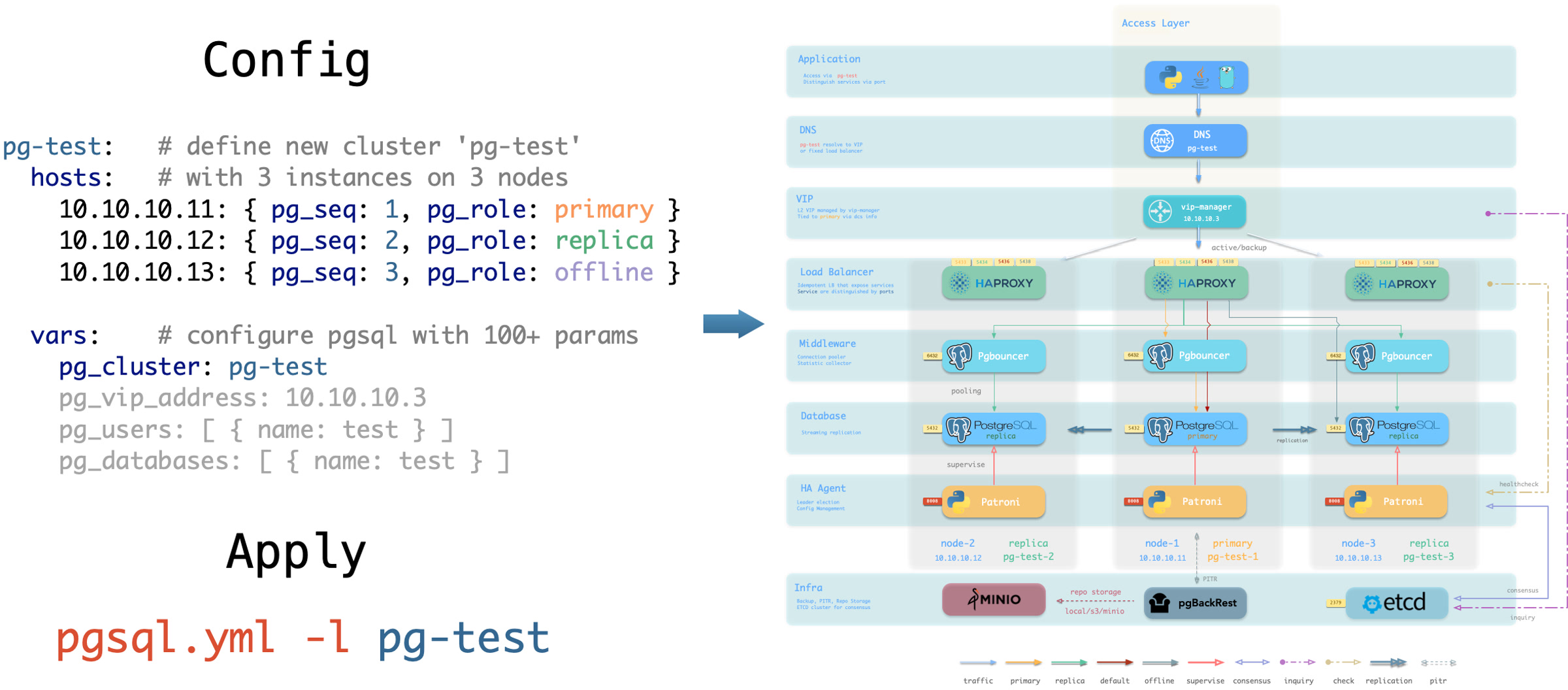
You can use different instance roles such as primary, replica, offline, delayed, sync standby; as well as different clusters: such as standby clusters, Citus clusters, and even Redis / MINIO (Silo) / Etcd clusters
Customize Cluster Content
Not only can you define clusters declaratively, but you can also define databases, users, services, and HBA rules within the cluster. For example, the following config file deeply customizes the content of the default pg-meta single-node database cluster:
Including: declaring six business databases and seven business users, adding an extra standby service (synchronous standby, providing read capability with no replication delay), defining some additional pg_hba rules, an L2 VIP address pointing to the cluster primary, and a customized backup strategy.
Declare Access Control
You can also customize Pigsty’s access control through declarative configuration. For example, the following config file provides deep security customization for the pg-meta cluster:
Uses the three-node core cluster template: crit.yml, to ensure data consistency is prioritized with zero data loss during failover.
Enables L2 VIP and restricts database and connection pool listening addresses to local loopback IP + internal network IP + VIP three specific addresses.
The template enables TLS for the Patroni API and PgBouncer, and requires SSL for database access through HBA.
It also enables $libdir/passwordcheck in pg_libs to enforce a password-strength policy.
Finally, a separate pg-meta-delay cluster is declared as pg-meta’s delayed replica from one hour ago, for emergency data deletion recovery.
Citus Distributed Cluster
Below is a declarative configuration for a four-node Citus distributed cluster:
Redis Clusters
Below are declarative configuration examples for Redis primary-replica cluster, sentinel cluster, and Redis Cluster:
ETCD Cluster
Below is a declarative configuration example for a three-node Etcd cluster:
MINIO (Silo) Cluster
Below is a declarative configuration example for a three-node Silo cluster. The inventory group and parameters retain the MINIO module’s compatibility names:
1 - Inventory
Every Pigsty deployment corresponds to an Inventory that describes key properties of the infrastructure and database clusters.
Configuration File
Pigsty uses Ansible YAML configuration format by default,
with a single YAML configuration file pigsty.yml as the inventory.
You can directly edit this configuration file to customize your deployment, or use the configure wizard script provided by Pigsty to automatically generate an appropriate configuration file.
Configuration Structure
The inventory uses standard Ansible YAML configuration format, consisting of two parts: global parameters (all.vars) and multiple groups (all.children).
You can define new clusters in all.children and describe the infrastructure using global variables: all.vars, which looks like this:
Cluster Definition
Each Ansible group may represent a cluster, which can be a node cluster, PostgreSQL cluster, Redis cluster, Etcd cluster, Silo cluster, etc.
A cluster definition consists of two parts: cluster members (hosts) and cluster parameters (vars).
You can define cluster members in <cls>.hosts and describe the cluster using configuration parameters in <cls>.vars.
Here’s an example of a 3-node high-availability PostgreSQL cluster definition:
Cluster-level vars (cluster parameters) override global parameters, and instance-level vars override both cluster parameters and global parameters.
Splitting Configuration
If your deployment is large or you want to better organize configuration files, you can split the inventory into multiple files for easier management and maintenance.
You can place cluster member definitions in the hosts.yml file and put cluster-level configuration parameters in corresponding files under the group_vars directory.
Switching Configuration
You can temporarily specify a different inventory file when running playbooks using the -i parameter.
Additionally, Ansible supports multiple configuration methods. You can use local yaml|ini configuration files, or use CMDB and any dynamic configuration scripts as configuration sources.
In Pigsty, we specify pigsty.yml in the same directory as the default inventory through ansible.cfg in the Pigsty home directory. You can modify it as needed.
Additionally, Pigsty supports using a CMDB metabase to store the inventory, facilitating integration with existing systems.
2 - Configure
Pigsty provides a configure script as a configuration wizard that automatically generates an appropriate pigsty.yml configuration file based on your current environment.
This is an optional script: if you already understand how to configure Pigsty, you can directly edit the pigsty.yml configuration file and skip the wizard.
Quick Start
Enter the pigsty source home directory and run ./configure to automatically start the configuration wizard. Without any arguments, it defaults to the meta single-node configuration template:
This command will use the selected template as a base, detect the current node’s IP address and region, and generate a pigsty.yml configuration file suitable for the current environment.
demo/configure.cast — /demo/configure.cast
Features
The configure script performs the following adjustments based on environment and input, generating pigsty.yml in the Pigsty directory by default.
- Detects the current node IP address; if multiple IPs exist, prompts the user to input a primary IP address as the node’s identity
- Uses the IP address to replace the placeholder
10.10.10.10in the configuration template and sets it as theadmin_ipparameter value - Detects the current region, setting
regiontodefault(global default repos) orchina(using Chinese mirror repos) - For micro instances (vCPU < 4), uses the
tinyparameter template fornode_tuneandpg_confto optimize resource usage - If
-vis specified, switchespg_versionandpg18-*package-group aliases in the template to that major version; fixed-kernel templatesmssql,polar, andpg19are excluded from this replacement - If
-gis specified, replaces default passwords recognized by the configuration wizard with randomly generated strong passwords; review uncovered values against the Default Credentials Checklist (strongly recommended) - When PG major version ≥ 17, prioritizes the built-in
C.UTF-8locale, or the OS-supportedC.UTF-8 - Checks if the core dependency
ansiblefor deployment is available in the current environment - Also checks if the deployment target node is SSH-reachable and can execute commands with sudo (
-sto skip)
Usage Examples
Command Arguments
Argument Details
| Argument | Description |
|---|---|
-c, --conf |
Generate config from conf/<template>.yml, supports subdirectories like ha/full |
-i, --ip |
Replace placeholder 10.10.10.10 in config template with specified IP |
-v, --version |
Specify PostgreSQL major version (14-19); PG19 is Beta, so prefer the dedicated pg19 template |
-r, --region |
Set software repo mirror region: default, china (Chinese mirrors), europe (European) |
-o, --output |
Output path, default pigsty.yml; relative paths use Pigsty home, absolute paths are used as given |
-s, --skip |
Skip IP probing, target SSH/Sudo checks, and effective IP replacement; keep 10.10.10.10 |
-x, --proxy |
Write current environment proxy variables (HTTP_PROXY, HTTPS_PROXY, ALL_PROXY, NO_PROXY) to config |
-n, --non-interactive |
Non-interactive mode; a single/demo IP is auto-selected, while ambiguous multi-IP hosts require -i |
-p, --port |
SSH port used by readiness checks only; it does not write ansible_port into the generated config |
-g, --generate |
Generate random values for passwords in config file, improving security (strongly recommended) |
Execution Flow
The configure script executes detection and configuration in the following order:
Automatic Behaviors
Region Detection
The script automatically detects the network environment to determine if you’re in mainland China (behind GFW):
- If Google is reachable, uses the
region: defaultrepositories - If Google is unreachable but
https://pigsty.ccis reachable, setsregion: china - If neither endpoint is reachable, falls back to
region: defaultand emits an internet-unreachable warning - Can manually specify region via
-rargument
IP Address Handling
The script determines the primary IP address in the following priority:
- Command line argument: If IP is specified via
-i, use it directly - Single IP detection: If the current node has only one IP, use it automatically
- Demo IP detection: If
10.10.10.10is detected, select it automatically (for sandbox environments) - Interactive input: When multiple IPs exist, prompt user to choose or input
Low-End Hardware Optimization
When fewer than 4 CPU cores are detected (1-3 cores), the script automatically adjusts configuration:
This ensures smooth operation on low-spec virtual machines.
Locale Settings
The script automatically enables C.UTF-8 as the default locale when:
- PostgreSQL version ≥ 17 (built-in Locale Provider support)
- Or the current system supports
C.UTF-8/C.utf8locale
China Region Special Handling
When region is set to china, the script automatically:
- Enables
docker_registry_mirrorsDocker mirror acceleration - Enables
PIP_MIRROR_URLPython mirror acceleration
Password Generation
When using the -g argument, the script generates 24-character random strings for the following passwords:
| Password Parameter | Description |
|---|---|
grafana_admin_password |
Grafana admin password |
pg_admin_password |
PostgreSQL admin password |
pg_monitor_password |
PostgreSQL monitor user password |
pg_replication_password |
PostgreSQL replication user password |
patroni_password |
Patroni API password |
haproxy_admin_password |
HAProxy admin password |
minio_secret_key |
Silo Root Secret |
etcd_root_password |
ETCD Root password |
It also replaces the following placeholder passwords:
DBUser.Meta→ random passwordDBUser.Viewer→ random passwordS3User.Backup→ random passwordS3User.Meta→ random passwordS3User.Data→ random passwordDBUser.Supa→ random passwordVibe.Coding→ random password
Configuration Templates
The script reads templates from conf/. The value of -c is a path relative to that directory without the .yml suffix, such as ha/full or app/immich.
Core Templates
| Template | Description |
|---|---|
meta |
Default template: Single-node installation with INFRA + NODE + ETCD + PGSQL |
rich |
Feature-rich version: Includes almost all extensions, Silo, local repo |
slim |
Minimal version: PostgreSQL + ETCD only, no monitoring infrastructure |
fat |
Complete version: rich base with more extensions installed |
pgsql |
Pure PostgreSQL template |
pg19 |
Single-node PostgreSQL 19 Beta evaluation template |
infra |
Pure infrastructure template |
HA Templates (ha/)
| Template | Description |
|---|---|
ha/dual |
2-node HA cluster |
ha/trio |
3-node HA cluster |
ha/full |
4-node complete sandbox environment |
ha/safe |
Security-hardened HA configuration |
ha/octo |
Compact 8-node HA simulation |
ha/simu |
20-node production simulation environment |
ha/citus |
13-node Citus distributed cluster |
Application Templates
| Template | Description |
|---|---|
supabase |
Supabase self-hosted configuration |
app/dify |
Dify AI platform configuration |
app/odoo |
Odoo ERP configuration |
app/electric |
Electric sync engine configuration |
app/insforge |
Insforge backend platform configuration |
app/hindsight |
Hindsight application configuration |
app/teable |
Teable table database configuration |
app/mattermost |
Mattermost collaboration platform configuration |
app/maybe |
Maybe finance application configuration |
app/registry |
Docker Registry configuration |
app/immich |
Immich photo and video management |
app/jumpserver |
JumpServer bastion host |
Special Kernel Templates
| Template | Description |
|---|---|
ivory |
IvorySQL: Oracle-compatible PostgreSQL |
mssql |
Babelfish: SQL Server-compatible PostgreSQL |
polar |
PolarDB: Alibaba Cloud open-source distributed PostgreSQL |
ha/citus |
Citus: Distributed PostgreSQL HA cluster |
mysql |
OpenHalo: MySQL protocol-compatible PostgreSQL |
pgtde |
Percona PostgreSQL Server: transparent encryption |
oriole |
OrioleDB: Next-generation storage engine |
agens |
AgensGraph: graph database kernel |
pgedge |
pgEdge: distributed PostgreSQL kernel |
mongo |
MongoDB-compatible stack template |
Demo and Build Templates
| Template | Description |
|---|---|
vibe |
Vibe Coding development environment |
docker |
Run Pigsty inside a Docker container |
demo/bare |
Minimal readable single-node example |
demo/el |
Full parameter example for EL distributions |
demo/debian |
Full parameter example for Debian/Ubuntu |
demo/demo |
Multi-module demo environment |
demo/kernel |
Ten-node database-kernel matrix |
demo/redis |
Redis replica, Sentinel, and native Cluster demo |
demo/minio |
Multi-node, multi-drive Silo demo (source default) |
demo/kafka |
Kafka KRaft development and secure-cluster demo |
demo/mysql |
Native MySQL 8.4 pilot demo |
demo/remote |
Remote PostgreSQL/RDS monitoring example |
demo/saas |
Legacy single-node SaaS component bundle |
demo/wool |
Small cloud-instance example for China |
build/oss |
Cross-distribution open-source package build env |
build/dev |
Three-node development and build environment |
Output Example
Environment Variables
The script supports the following environment variables:
| Environment Variable | Description | Default |
|---|---|---|
PIGSTY_HOME |
Pigsty installation directory | ~/pigsty |
METADB_URL |
Metabase connection URL | service=meta |
HTTP_PROXY |
HTTP proxy | - |
HTTPS_PROXY |
HTTPS proxy | - |
ALL_PROXY |
Universal proxy | - |
NO_PROXY |
Proxy whitelist | Built-in default |
Notes
-
Passwordless access: Before running
configure, ensure the current user has passwordless sudo privileges and passwordless SSH to localhost. This can be automatically configured via thebootstrapscript. -
IP address selection: Choose an internal IP as the primary IP address, not a public IP or
127.0.0.1. -
Password security: In production, always change default passwords in the configuration file. Use
-gto randomize recognized credentials, then review the Default Credentials Checklist for remaining values. -
Configuration review: After the script completes, it’s recommended to review the generated
pigsty.ymlfile to confirm the configuration meets expectations. -
Multiple executions: You can run
configuremultiple times to regenerate configuration; each run will overwrite the existingpigsty.yml. -
macOS limitations: When running on macOS, the script skips some Linux-specific checks and uses placeholder IP
10.10.10.10. macOS can only serve as an admin node.
FAQ
How to use a custom configuration template?
Place your configuration file in the conf/ directory, then specify it with the -c argument:
How to generate different configurations for multiple clusters?
Use the -o argument to specify different output files:
Then specify the configuration file when running playbooks:
How to handle multiple IPs in non-interactive mode?
You must explicitly specify the IP address using the -i argument:
How to keep the placeholder IP in the template?
Use the -s argument to skip IP replacement:
Related Documentation
- Inventory: Understand the Ansible inventory structure
- Parameters: Understand Pigsty parameter hierarchy and priority
- Templates: View all available configuration templates
- Installation: Understand the complete installation process
- Metabase: Use PostgreSQL as a dynamic configuration source
3 - Parameters
In the inventory, you can use various parameters to fine-tune Pigsty customization. These parameters cover everything from infrastructure settings to database configuration.
Parameter List
According to the current source and parameter reference pages, Pigsty’s 10 official modules expose 373 public parameters for fine-grained control. See Reference - Parameter List for the complete list. The native MySQL 8.4 pilot module exposes 13 additional public parameters that are listed separately and excluded from this total.
| Module | Groups | Params | Description |
|---|---|---|---|
| PGSQL | 9 | 124 | PostgreSQL high-availability cluster configuration |
| INFRA | 10 | 73 | Software repositories and Victoria observability infrastructure |
| NODE | 11 | 73 | Node initialization, system tuning, and operations baseline |
| ETCD | 2 | 13 | ETCD cluster and removal protection parameters |
| MINIO | 2 | 22 | Silo deployment, observability, and removal parameters |
| REDIS | 2 | 22 | Redis/Valkey deployment and removal parameters |
| DOCKER | 1 | 8 | Docker engine parameters |
| JUICE | 1 | 2 | JuiceFS instance and cache parameters |
| VIBE | 1 | 18 | Code/Jupyter/Node.js/Claude/Codex configuration |
| KAFKA | 2 | 18 | Kafka deployment and removal-protection parameters |
Parameter Form
Parameters are key-value pairs that describe entities. The Key is a string, and the Value can be one of five types: boolean, string, number, array, or object.
Parameter Priority
Parameters can be set at different levels with the following priority:
| Level | Location | Description | Priority |
|---|---|---|---|
| CLI | -e command line argument |
Passed via command line | Highest (5) |
| Host/Instance | <group>.hosts.<host> |
Parameters specific to a single host | Higher (4) |
| Group/Cluster | <group>.vars |
Parameters shared by hosts in group/cluster | Medium (3) |
| Global | all.vars |
Parameters shared by all hosts | Lower (2) |
| Default | <roles>/default/main.yml |
Role implementation defaults | Lowest (1) |
Here are some examples of parameter priority:
- Use command line parameter
-e grafana_clean=truewhen running playbooks to wipe Grafana data - Use instance-level parameter
pg_roleon host variables to override pg instance role - Use cluster-level parameter
pg_clusteron group variables to override pg cluster name - Use global parameter
node_ntp_serverson global variables to specify global NTP servers - If
pg_versionis not set, Pigsty will use the default value from thepgsqlrole implementation (default is18)
Except for identity parameters, every parameter has an appropriate default value, so explicit setting is not required.
Identity Parameters
Identity parameters are special parameters that serve as entity ID identifiers, therefore they have no default values and must be explicitly set.
| Module | Identity Parameters |
|---|---|
PGSQL |
pg_cluster, pg_seq, pg_role, … |
NODE |
nodename, node_cluster |
ETCD |
etcd_cluster, etcd_seq |
MINIO |
minio_cluster, minio_seq |
REDIS |
redis_cluster, redis_node, redis_instances |
INFRA |
infra_seq |
The exception is etcd_cluster, which still defaults to etcd.
Object storage minio_cluster no longer has a default and must be defined explicitly in each object-storage cluster’s variables.
Do not place it in all.vars, or every host will be marked as a MINIO module member.
4 - Conf Templates
In Pigsty, deployment blueprint details are defined by the inventory, which is the pigsty.yml configuration file. You can customize it through declarative configuration.
However, writing configuration files directly can be daunting for new users. To address this, we provide some ready-to-use configuration templates covering common usage scenarios.
Each template is a predefined pigsty.yml configuration file containing reasonable defaults suitable for specific scenarios.
You can choose a template as your customization starting point, then modify it as needed to meet your specific requirements.
Using Templates
Pigsty provides the configure script as an optional configuration wizard that generates an inventory with good defaults based on your environment and input.
Use ./configure -c <conf> to specify a configuration template, where <conf> is the path relative to the conf directory (the .yml suffix can be omitted).
If no template is specified, Pigsty defaults to the meta.yml single-node configuration template.
Template List
Main Templates
The following are single-node configuration templates for installing Pigsty on a single server:
| Template | Description |
|---|---|
meta.yml |
Default template, single-node PostgreSQL online installation |
rich.yml |
Feature-rich template with local repo, Silo, and more examples |
slim.yml |
Minimal template, PostgreSQL only without monitoring and infrastructure |
Database Kernel Templates
Templates for various database management systems and kernels:
| Template | Description |
|---|---|
pgsql.yml |
Native PostgreSQL kernel, basic features (14~18) |
pg19.yml |
PostgreSQL 19 Beta trial template |
mssql.yml |
Babelfish kernel, SQL Server protocol compatible (17/18) |
polar.yml |
PolarDB PG kernel, Aurora/RAC style (17) |
ivory.yml |
IvorySQL kernel, Oracle syntax compatible (18) |
mysql.yml |
OpenHalo kernel, MySQL compatible (14) |
pgtde.yml |
Percona PostgreSQL Server transparent encryption (18) |
oriole.yml |
OrioleDB kernel, OLTP enhanced (16~18) |
agens.yml |
AgensGraph graph database kernel (17) |
pgedge.yml |
pgEdge distributed database kernel (15~18, default 18) |
supabase.yml |
Supabase self-hosted configuration (15~18) |
You can add more nodes later or use HA templates to plan your cluster from the start.
HA Templates
You can configure Pigsty to run on multiple nodes, forming a high-availability (HA) cluster:
| Template | Description |
|---|---|
dual.yml |
2-node semi-HA deployment |
trio.yml |
3-node standard HA deployment |
full.yml |
4-node standard deployment |
safe.yml |
4-node security-enhanced deployment with delayed replica |
octo.yml |
Compact 8-node HA simulation |
simu.yml |
20-node production environment simulation |
ha/citus.yml |
Citus distributed HA PostgreSQL (14~18) |
Application Templates
You can use the following templates to run Docker applications/software:
| Template | Description |
|---|---|
supabase.yml |
Start single-node Supabase |
odoo.yml |
Start Odoo ERP system |
dify.yml |
Start Dify AI workflow system |
electric.yml |
Start Electric sync engine |
insforge.yml |
Start Insforge backend platform |
hindsight.yml |
Start Hindsight application |
mattermost.yml |
Start Mattermost collaboration platform |
teable.yml |
Start Teable spreadsheet database |
maybe.yml |
Start Maybe finance app |
registry.yml |
Start Docker Registry |
Demo Templates
Besides main templates, Pigsty provides a set of demo templates for different scenarios:
| Template | Description |
|---|---|
el.yml |
Full-parameter config file for EL 8/9 systems |
debian.yml |
Full-parameter config file for Debian/Ubuntu systems |
remote.yml |
Example config for monitoring remote PostgreSQL clusters or RDS |
redis.yml |
Redis cluster example configuration |
minio.yml |
4-node multi-drive Silo cluster example (source default) |
kafka.yml |
Kafka dynamic KRaft example with a single-node dev cluster and a three-node secure cluster |
mysql.yml |
Native MySQL 8.4 single-node/three-node pilot example; distinct from OpenHalo conf/mysql.yml |
demo.yml |
Configuration file for Pigsty public demo site |
fat.yml |
Single-node config with local repo and full feature set |
infra.yml |
Deploy only the infrastructure modules |
vibe.yml |
Vibe Coding / AI application development template |
mongo.yml |
FerretDB / MongoDB-compatible example |
docker.yml |
Docker application host template |
Build Templates
The following configuration templates are for development and testing purposes:
| Template | Description |
|---|---|
build/oss.yml |
Open source build config for EL 9/10, Debian 12/13, Ubuntu 22.04/24.04/26.04 |
build/dev.yml |
Development and testing build config |
5 - Use CMDB as Config Inventory
Pigsty allows you to use a PostgreSQL metabase as a dynamic configuration source, replacing static YAML configuration files for more powerful configuration management capabilities.
Overview
CMDB (Configuration Management Database) is a method of storing configuration information in a database for management.
In Pigsty, the default configuration source is a static YAML file pigsty.yml,
which serves as Ansible’s inventory.
This approach is simple and direct, but when infrastructure scales and requires complex, fine-grained management and external integration, a single static file becomes insufficient.
| Feature | Static YAML File | CMDB Metabase |
|---|---|---|
| Querying | Manual search/grep | SQL queries with any conditions, aggregation analysis |
| Versioning | Depends on Git or manual backup | Database transactions, audit logs, time-travel snapshots |
| Access Control | File system permissions, coarse-grained | PostgreSQL fine-grained access control |
| Concurrent Editing | Requires file locking or merge conflicts | Database transactions naturally support concurrency |
| External Integration | Requires YAML parsing | Standard SQL interface, easy integration with any language |
| Scalability | Difficult to maintain when file becomes too large | Scales to physical limits |
| Dynamic Generation | Static file, changes require manual application | Immediate effect, real-time configuration changes |
Pigsty provides the CMDB database schema in the sample database pg-meta.meta schema baseline definition.
How It Works
The core idea of CMDB is to replace the static configuration file with a dynamic script.
Ansible supports using executable scripts as inventory, as long as the script outputs inventory data in JSON format.
When you enable CMDB, Pigsty creates a dynamic inventory script named inventory.sh:
This script’s function is simple: every time Ansible needs to read the inventory, it queries configuration data from the PostgreSQL database’s pigsty.inventory view and returns it in JSON format.
The overall architecture is as follows:
flowchart LR
    conf["bin/inventory_conf"]
    tocmdb["bin/inventory_cmdb"]
    load["bin/inventory_load"]
    ansible["🚀 Ansible"]

    subgraph static["📄 Static Config Mode"]
        yml[("pigsty.yml")]
    end

    subgraph dynamic["🗄️ CMDB Dynamic Mode"]
        sh["inventory.sh"]
        cmdb[("PostgreSQL CMDB")]
    end

    conf -->|"switch"| yml
    yml -->|"load config"| load
    load -->|"write"| cmdb
    tocmdb -->|"switch"| sh
    sh --> cmdb

    yml --> ansible
    cmdb --> ansible
Data Model
The CMDB database schema is defined in files/cmdb.sql, with all objects in the pigsty schema.
Core Tables
| Table | Description | Primary Key |
|---|---|---|
pigsty.group |
Cluster/group definitions, corresponds to Ansible groups | cls |
pigsty.host |
Host definitions, belongs to a group | (cls, ip) |
pigsty.global_var |
Global variables, corresponds to all.vars |
key |
pigsty.group_var |
Group variables, corresponds to all.children.<cls>.vars |
(cls, key) |
pigsty.host_var |
Host variables, host-level variables | (cls, ip, key) |
pigsty.default_var |
Default variable definitions, stores parameter metadata | key |
pigsty.job |
Job records table, records executed tasks | id |
Table Structure Details
Cluster Table pigsty.group
Host Table pigsty.host
Global Variables Table pigsty.global_var
Group Variables Table pigsty.group_var
Host Variables Table pigsty.host_var
Core Views
CMDB provides a series of views for querying and displaying configuration data:
| View | Description |
|---|---|
pigsty.inventory |
Core view: Generates Ansible dynamic inventory JSON |
pigsty.raw_config |
Raw configuration in JSON format |
pigsty.global_config |
Global config view, merges defaults and global vars |
pigsty.group_config |
Group config view, includes host list and group vars |
pigsty.host_config |
Host config view, merges group and host-level vars |
pigsty.pg_cluster |
PostgreSQL cluster view |
pigsty.pg_instance |
PostgreSQL instance view |
pigsty.pg_database |
PostgreSQL database definition view |
pigsty.pg_users |
PostgreSQL user definition view |
pigsty.pg_service |
PostgreSQL service definition view |
pigsty.pg_hba |
PostgreSQL HBA rules view |
pigsty.pg_remote |
Remote PostgreSQL instance view |
pigsty.inventory is the core view that converts database configuration data to the JSON format required by Ansible:
Utility Scripts
Pigsty provides three convenience scripts for managing CMDB:
| Script | Function |
|---|---|
bin/inventory_load |
Load YAML configuration file into PostgreSQL database |
bin/inventory_cmdb |
Switch configuration source to CMDB (dynamic inventory script) |
bin/inventory_conf |
Switch configuration source to static config file pigsty.yml |
inventory_load
Parse and import YAML configuration file into CMDB:
The script performs the following operations:
- Clears existing data in the
pigstyschema - Parses the YAML configuration file
- Writes global variables to the
global_vartable - Writes cluster definitions to the
grouptable - Writes cluster variables to the
group_vartable - Writes host definitions to the
hosttable - Writes host variables to the
host_vartable
Environment Variables
PIGSTY_HOME: Pigsty installation directory, defaults to~/pigstyMETADB_URL: Database connection URL, defaults toservice=meta
inventory_cmdb
Switch Ansible to use CMDB as the configuration source:
The script performs the following operations:
- Creates dynamic inventory script
${PIGSTY_HOME}/inventory.sh - Modifies
ansible.cfgto setinventorytoinventory.sh
The generated inventory.sh contents:
inventory_conf
Switch back to using static YAML configuration file:
The script modifies ansible.cfg to set inventory back to pigsty.yml.
Usage Workflow
First-time CMDB Setup
- Initialize CMDB schema (usually done automatically during Pigsty installation):
- Load configuration to database:
- Switch to CMDB mode:
- Verify configuration:
Query Configuration
After enabling CMDB, you can flexibly query configuration using SQL:
Modify Configuration
You can modify configuration directly via SQL:
Changes take effect immediately without reloading or restarting any service.
Switch Back to Static Configuration
To switch back to static configuration file mode:
Advanced Usage
Export Configuration
Export CMDB configuration to YAML format:
Or use the ansible-inventory command:
Configuration Auditing
Track configuration changes using the mtime field:
Integration with External Systems
CMDB uses standard PostgreSQL, making it easy to integrate with other systems:
- Web Management Interface: Expose configuration data through REST API (e.g., PostgREST)
- CI/CD Pipelines: Read/write database directly in deployment scripts
- Monitoring & Alerting: Generate monitoring rules based on configuration data
- ITSM Systems: Sync with enterprise CMDB systems
Considerations
-
Data Consistency: After modifying configuration, you need to re-run the corresponding Ansible playbooks to apply changes to the actual environment
-
Backup: Configuration data in CMDB is critical, ensure regular backups
-
Permissions: Configure appropriate database access permissions for CMDB to avoid accidental modifications
-
Transactions: When making batch configuration changes, perform them within a transaction for rollback on errors
-
Connection Pooling: The
inventory.shscript creates a new connection on each execution; if Ansible runs frequently, consider using connection pooling
Summary
CMDB is Pigsty’s advanced configuration management solution, suitable for scenarios requiring large-scale cluster management, complex queries, external integration, or fine-grained access control. By storing configuration data in PostgreSQL, you can fully leverage the database’s powerful capabilities to manage infrastructure configuration.
| Feature | Description |
|---|---|
| Storage | PostgreSQL pigsty schema |
| Dynamic Inventory | inventory.sh script |
| Config Load | bin/inventory_load |
| Switch to CMDB | bin/inventory_cmdb |
| Switch to YAML | bin/inventory_conf |
| Core View | pigsty.inventory |