# Install Pigsty for Production
> How to install Pigsty on Linux hosts for production?
---
LLMS index: [llms.txt](/llms.txt)
---
This is the Pigsty production multi-node deployment guide. For single-node Demo/Dev setups, see [**Getting Started**](/docs/setup/).
----------------
## Summary
[**Prepare**](/docs/deploy/prepare) [**nodes**](/docs/deploy/prepare#node) with [**SSH access**](/docs/deploy/admin#ssh) following your [**architecture plan**](/docs/deploy/planning),
install a [**compatible Linux OS**](/docs/ref/linux/), then execute with an [**admin user**](/docs/deploy/admin) having passwordless [**`ssh`**](/docs/deploy/admin#ssh) and [**`sudo`**](/docs/deploy/admin#sudo):
```bash
curl -fsSL https://repo.pigsty.io/get | bash; # International
curl -fsSL https://repo.pigsty.cc/get | bash; # Backup Mirror
```
This runs the [**install**](#install) script, downloading and extracting Pigsty source to your home directory with dependencies installed. Complete [**configuration**](#configure) and [**deployment**](#deploy) to finish.
Before running [**`deploy.yml`**](/docs/setup/playbook) for deployment, review and edit the [**configuration inventory**](/docs/concept/iac/inventory): `pigsty.yml`.
```bash
cd ~/pigsty # Enter Pigsty directory
./configure -g # Generate config file (optional, skip if you know how to configure)
./deploy.yml # Execute deployment playbook based on generated config
```
After installation, access the [**WebUI**](/docs/setup/webui/) via IP/domain + ports `80/443`,
and [**PostgreSQL service**](/docs/setup/pgsql/) via port `5432`.
Full installation takes 3-10 minutes depending on specs/network. [**Offline installation**](/docs/setup/offline/) significantly speeds this up; [**slim installation**](/docs/setup/slim/) further accelerates when monitoring isn't needed.
**Video Example: 20-node Production Simulation (Ubuntu 24.04 x86_64)**
----------------
## Prepare
Production Pigsty deployment involves [**preparation work**](/docs/deploy/prepare). Here's the complete checklist:
| Item | Requirement | Item | Requirement |
|:-----------------------------------------:|:-----------------------------------------|:--------------------------------------------------------:|:--------------------------------------------------------|
| [**Node**](/docs/deploy/prepare#node) | At least `1C2G`, no upper limit | [**Plan**](/docs/deploy/planning) | Multiple homogeneous nodes: 2/3/4 or more |
| [**Disk**](/docs/deploy/prepare#disk) | `/data` as default mount point | [**FS**](/docs/deploy/prepare#filesystem) | `xfs` recommended; `ext4`/`zfs` as needed |
| [**VIP**](/docs/deploy/prepare#vip) | L2 VIP, optional (unavailable in cloud) | [**Network**](/docs/deploy/prepare#network) | Static IPv4, single-node can use `127.0.0.1` |
| [**CA**](/docs/deploy/prepare#ca) | Self-signed CA or specify existing certs | [**Domain**](/docs/deploy/prepare#domain) | Local/public domain, optional, default `i.pigsty` |
| [**Kernel**](/docs/deploy/prepare#linux) | `Linux` `x86_64` / `aarch64` | [**Linux**](/docs/deploy/prepare#linux) | `el8`, `el9`, `el10`, `d12`, `d13`, `u22`, `u24`, `u26` |
| [**Locale**](/docs/deploy/prepare#locale) | `C.UTF-8` or `C` | [**Firewall**](/docs/deploy/admin#firewall) | Ports: `80`/`443`/`22`/`5432` (optional) |
| [**User**](/docs/deploy/admin#user) | Avoid `root` and `postgres` | [**Sudo**](/docs/deploy/admin#sudo) | sudo privilege, preferably with `nopass` |
| [**SSH**](/docs/deploy/admin#ssh) | Passwordless SSH via public key | [**Accessible**](/docs/deploy/admin#check-accessibility) | `ssh sudo ls` no error |
{.full-width}
----------------
## Install
Use the following to automatically install the [**Pigsty source package**](/docs/deploy/prepare#pigsty) to `~/pigsty` (recommended). Deployment dependencies (Ansible) are auto-installed.
```bash {tab="pigsty.io (Global)" group="pigstyio-global-pigstycc-china" value="pigstyio-global"}
curl -fsSL https://repo.pigsty.io/get | bash # Install current default version
curl -fsSL https://repo.pigsty.io/get | bash -s v4.5.0 # Explicitly install the current public stable release
```
```bash {tab="pigsty.cc (China)" value="pigstycc-china"}
curl -fsSL https://repo.pigsty.cc/get | bash # Install current default version
curl -fsSL https://repo.pigsty.cc/get | bash -s v4.5.0 # Explicitly install the current public stable release
```
If you prefer not to run remote scripts, manually [**download**](https://github.com/pgsty/pigsty/releases) or clone the source. When using `git`, always checkout a specific version before use:
```bash
git clone https://github.com/pgsty/pigsty; cd pigsty;
git checkout v4.5.0; # Always checkout a released tag when using git
```
For manual download/clone, additionally run [**`bootstrap`**](/docs/setup/offline#bootstrap) to manually install Ansible and other dependencies, or [**install them yourself**](/docs/setup/playbook#install-ansible):
```bash
./bootstrap # Install ansible for subsequent deployment
```
----------------
## Configure
In Pigsty, deployment details are defined by the [**configuration inventory**](/docs/setup/config/)—the [**`pigsty.yml`**](https://github.com/pgsty/pigsty/blob/main/pigsty.yml) config file. Customize through declarative configuration.
Pigsty provides [**`configure`**](https://github.com/pgsty/pigsty/blob/main/configure) as an optional [**configuration wizard**](/docs/concept/iac/configure),
generating a [**configuration inventory**](/docs/concept/iac/inventory/) with good defaults based on your environment:
```bash
./configure -g # Use wizard to generate config with random passwords
```
The generated config defaults to `~/pigsty/pigsty.yml`. Review and customize before installation.
Many [**configuration templates**](/docs/concept/iac/template/) are available for reference. You can skip the wizard and directly edit `pigsty.yml`:
```bash
./configure -c ha/full -g # Use 4-node sandbox template
./configure -c ha/trio -g # Use 3-node minimal HA template
./configure -c ha/dual -g -v 18 # Use 2-node semi-HA template with PG 18
./configure -c ha/simu -s # Use 20-node production simulation, skip IP check, no random passwords
```
> [!DETAILS]- Example configure output
> ```bash
> vagrant@meta:~/pigsty$ ./configure
> configure pigsty v4.5.0 begin
> [ OK ] region = china
> [ OK ] kernel = Linux
> [ OK ] machine = x86_64
> [ OK ] package = deb,apt
> [ OK ] vendor = ubuntu (Ubuntu)
> [ OK ] version = 22 (22.04)
> [ OK ] sudo = vagrant ok
> [ OK ] ssh = vagrant@127.0.0.1 ok
> [WARN] Multiple IP address candidates found:
> (1) 192.168.121.38 inet 192.168.121.38/24 metric 100 brd 192.168.121.255 scope global dynamic eth0
> (2) 10.10.10.10 inet 10.10.10.10/24 brd 10.10.10.255 scope global eth1
> [ OK ] primary_ip = 10.10.10.10 (from demo)
> [ OK ] admin = vagrant@10.10.10.10 ok
> [ OK ] mode = meta (ubuntu22.04)
> [ OK ] locale = C.UTF-8
> [ OK ] ansible = ready
> [ OK ] pigsty configured
> [WARN] don't forget to check it and change passwords!
> proceed with ./deploy.yml
> ```
The wizard only replaces the **current node's** IP (use `-s` to skip replacement). For multi-node deployments, replace other node IPs manually.
Also customize the config as needed—modify default passwords, add nodes, etc.
**Common configure parameters**:
| Parameter | Description |
|:------------------------|:----------------------------------------------------------------------------------------|
| `-c\|--conf` | Specify [**config template**](/docs/conf/) relative to `conf/`, without `.yml` suffix |
| `-v\|--version` | PostgreSQL major version `14` through `19`; PG19 is currently Beta |
| `-r\|--region` | Upstream repo region for faster downloads: `default\|china\|europe` |
| `-n\|--non-interactive` | Use CLI params for primary IP, skip interactive wizard |
| `-x\|--proxy` | Configure [`proxy_env`](/docs/infra/param#proxy_env) from current environment variables |
{.full-width}
If your machine has multiple IPs, explicitly specify one with `-i|--ip ` or provide it interactively.
The script replaces IP placeholder `10.10.10.10` with the current node's primary IPv4. Use a static IP; never use public IPs.
Generated config is at `~/pigsty/pigsty.yml`. Review and modify before installation.
> [!CAUTION] Change default passwords!
> Change default passwords and credentials before installation. See [**Security Recommendations**](/docs/setup/security#passwords).
--------
## Deploy
Pigsty's [**`deploy.yml`**](/docs/setup/playbook/) [**playbook**](/docs/setup/playbook/) applies the [**configuration**](#configure) blueprint to **all target nodes**.
```bash
./deploy.yml # Deploy core modules on all target nodes at once
```
> [!DETAILS]- Example deployment output
> ```bash
> ......
>
> TASK [pgsql : pgsql init done] *************************************************
> ok: [10.10.10.11] => {
> "msg": "postgres://10.10.10.11/postgres | meta | dbuser_meta dbuser_view "
> }
> ......
>
> TASK [pg_monitor : load grafana datasource meta] *******************************
> changed: [10.10.10.11]
>
> PLAY RECAP *********************************************************************
> 10.10.10.11 : ok=302 changed=232 unreachable=0 failed=0 skipped=65 rescued=0 ignored=1
> localhost : ok=6 changed=3 unreachable=0 failed=0 skipped=1 rescued=0 ignored=0
> ```
>
> When output ends with `pgsql init done`, `PLAY RECAP`, etc., installation is complete!
> [!WARNING] Upstream repo changes may cause online installation failures!
> Upstream repos (Linux/PGDG) may break due to improper updates, causing deployment failures (quite common)!
> For serious production deployments, we strongly recommend using verified [**offline packages**](/docs/setup/offline#offline-package) for [**offline installation**](/docs/setup/offline).
> [!WARNING] Avoid running deploy playbook repeatedly!
> Warning: Running [**`deploy.yml`**](https://github.com/pgsty/pigsty/blob/main/deploy.yml) again on an initialized environment may restart services and overwrite configs. Be careful!
--------
## Interface
Assuming the [**4-node**](/docs/conf/full) deployment template, your Pigsty environment should have a structure like:
| ID | [NODE](/docs/node/) | [PGSQL](/docs/pgsql/) | [INFRA](/docs/infra/) | [**ETCD**](/docs/etcd/) |
|:--:|:-------------------:|:---------------------:|:---------------------:|:-----------------------:|
| 1 | `10.10.10.10` | `pg-meta-1` | `infra-1` | `etcd-1` |
| 2 | `10.10.10.11` | `pg-test-1` | - | - |
| 3 | `10.10.10.12` | `pg-test-2` | - | - |
| 4 | `10.10.10.13` | `pg-test-3` | - | - |
{.full-width}
The [**`INFRA`**](/docs/infra) module provides a [**graphical management interface**](/docs/setup/webui) via browser, accessible through Nginx's **80/443** ports.
The [**`PGSQL`**](/docs/pgsql/) module provides a [**PostgreSQL database server**](/docs/setup/pgsql) on port **5432**, also accessible via Pgbouncer/HAProxy [**proxies**](/docs/pgsql/service).
For production multi-node HA PostgreSQL clusters, use [**service access**](/docs/pgsql/misc/svc) for automatic traffic routing.
[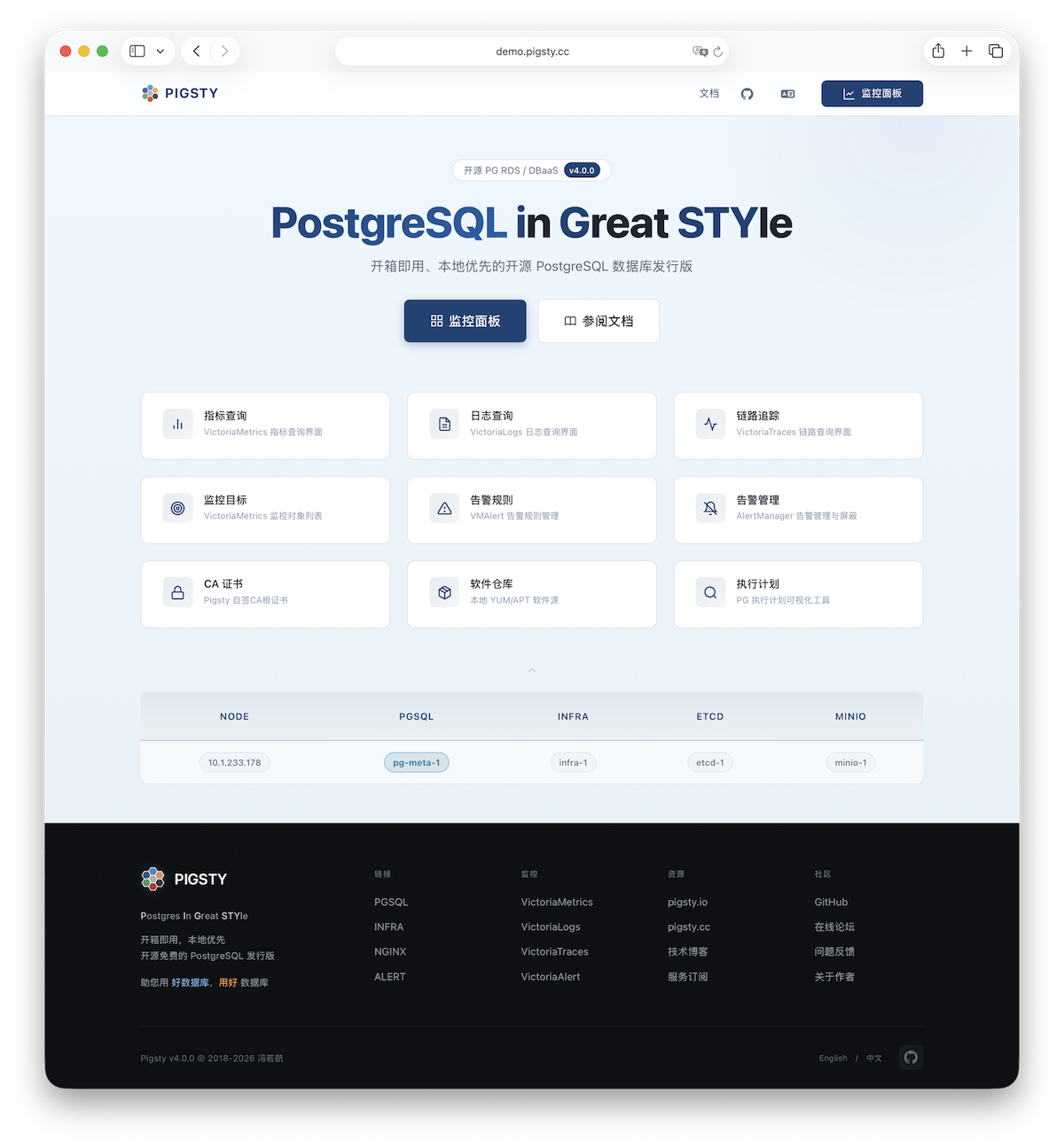](https://demo.pigsty.io)
----------------
## More
After installation, explore the [**WebUI**](/docs/setup/webui/) and access [**PostgreSQL service**](/docs/setup/pgsql/) via port 5432.
Deploy and monitor [**more clusters**](/docs/conf/full)—add definitions to the [**configuration inventory**](/docs/setup/config/) and run:
```bash
bin/node-add pg-test # Add pg-test cluster's 3 nodes to Pigsty management
bin/pgsql-add pg-test # Initialize a 3-node pg-test HA PG cluster
bin/redis-add redis-ms # Initialize Redis cluster: redis-ms
```
Most modules require the [**`NODE`**](/docs/node/) module first. See available [**modules**](/docs/ref/module/):
[**`PGSQL`**](/docs/pgsql/), [**`INFRA`**](/docs/infra/), [**`NODE`**](/docs/node/), [**`ETCD`**](/docs/etcd/),
[**`MINIO`**](/docs/minio/), [**`REDIS`**](/docs/redis/), [**`DOCKER`**](/docs/docker/)...